Change a site's title, description, logo, and site information settings
Body
-
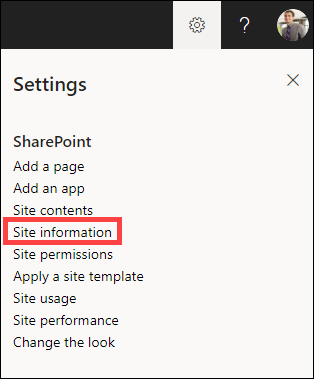
Select Settings, and then select Site information.
-
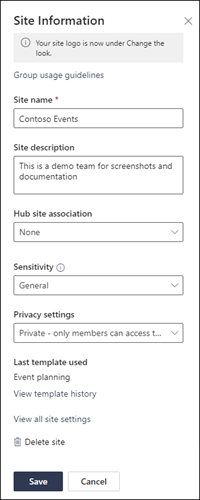
Make changes to the following fields, as necessary:
-
Site name (required)
-
Site description
-
Hub site association:
Select a SharePoint hub site to associate with your existing site.
-
Sensitivity:
Indicate the type of information that your site will contain and its level of confidentiality. This label will appear in the upper-right of your SharePoint site.
-
Privacy settings (Team sites only):
Select if you only want members to access your site, or anyone in your organization.
Details
Details
Article ID:
4477
Created
Mon 4/24/23 11:07 AM
Modified
Mon 4/24/23 11:07 AM